How to Check Nadakacheri Status Online in 2026?
Applied for a caste, income or domicile certificate on Nadakacheri 5.0? You can easily check your application status online using your RD number or mobile number no need to visit any office. In this guide, you will learn:
Basics
What is Nadakacheri Status?
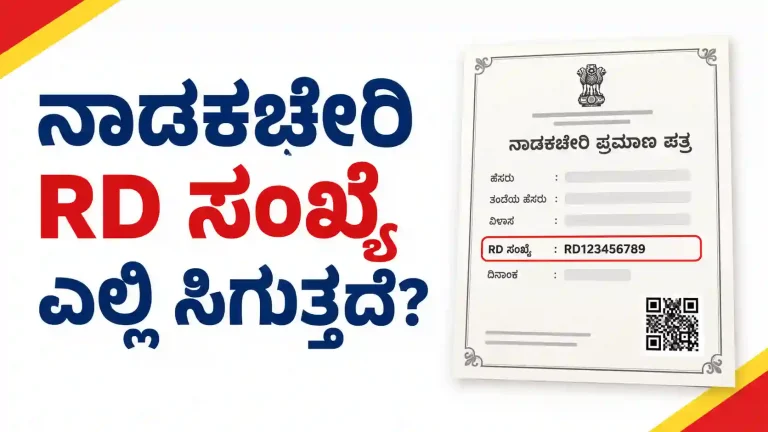
When you apply for any certificate on Nadakacheri 5.0, you get a unique tracking number called RD Number (also known as Acknowledgment Number).
Using this RD Number, you can check the live status of your application anytime. The status page shows which officer is currently handling your file and whether it is Pending, Forwarded, Approved, or Rejected. You can check your AJSK status check online anytime using a phone or computer. The status page is open 24 hours.
Two Methods
Two Ways to Check Nadakacheri Status
There are two ways to do the Nadakacheri RD status check online. Use whichever is easier for you.
Method 1: Using Your RD Number
This is the fastest way. This is how most people do the Nadakacheri RD status check online.
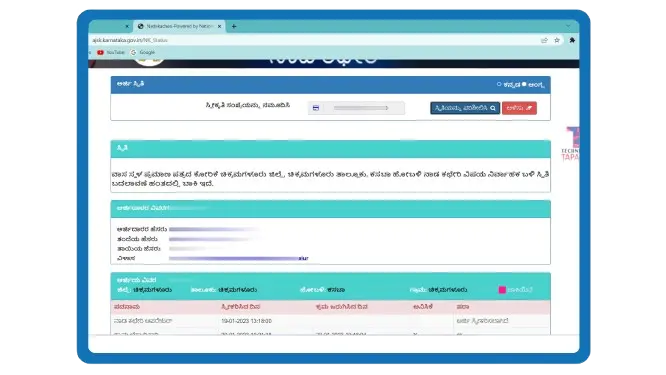
Your application details will appear on the screen. This same page works for income certificate status check online, caste certificate status check, domicile certificate, family tree and all other certificate types. There is no separate page for each type.
Method 2: Using Your Mobile Number
Use this if you forgot your RD number.
Your application will appear. Click on the RD number to see full details.
Important: Never share your OTP with anyone. No Nadakacheri official will ever call and ask for your OTP.
Tip: If you applied at a Nadakacheri center by visiting in person, you can still check your status online using both methods above.
Read the Table
What You See on the Status Page
When you open your application status, you will see a table with several columns. Here is what each one means in simple words:
Meaning
What Each Status Means
When you check Nadakacheri status you will see the following status depending on the stage of application:
Pending
Your application is with an officer and they have not taken any action yet. You need to wait.
Forwarded
The officer has completed their check and sent the application to the next higher officer. This is a positive sign.
Approved
All required officers have approved your application. Your certificate is ready to download.
Rejected
Your application has been rejected. Check the Remarks column to know the exact reaso
Who Checks It
Who Reviews Your Application? Officers Explained
Your Nadakacheri application does not get approved by just one person. It usually passes through multiple officers:
In some cases (especially with e-Kshana), the process can be much faster if your details match government records perfectly.
Timeline
How Long Does Each Stage Take?
The total time depends on how fast each officer acts. Here is a general idea:
Case Worker
1 to 2 days
VAO Check
2 to 5 days
Revenue Inspector
2 to 5 days
Tahsildar
1 to 3 days
So the total time is usually 7 to 21 days for a normal application. Income certificates can take up to 30 days and family tree certificates up to 45 days. If everything matches perfectly and e-Kshana applies, you can get it the same day. In busy periods like college admission season, delays are more common.
If your application has been sitting at one officer for more than 7 days without any action, that is a sign to follow up.
Same Day
What is e-Kshana Status?
e-Kshana is a special feature in Nadakacheri 5.0. When your details match the government records perfectly, the system can approve your certificate on the same day without waiting for each officer one by one.
If you see “e-Kshana” on your status page, it means the system is processing your certificate quickly. This is a good sign. Your certificate should be ready very soon.
Not everyone gets e-Kshana. It depends on how well your Aadhaar details and village records match.
Avoid These
Why Applications Get Rejected
Here are the most common reasons your application may get rejected:
Most applications get rejected due to small mistakes. Common reasons include:
- Name, address or date of birth not matching Aadhaar
- Blurry or unclear documents
- Missing required documents
- Address proof does not match the address entered in the form
- Wrong or inactive mobile number
- Duplicate application already exists
- e-Sign not completed properly
Always read the Remarks column carefully. It clearly tells you the exact reason for rejection.
Fix and Retry
What to Do After Rejection
- Open your status page and read the Remarks carefully
- Correct the mistake or collect the missing document
- Apply again as a new application on the Nadakacheri portal
- Make sure all details match your Aadhaar and documents exactly
There is no limit on how many times you can re-apply.
Too Slow?
If Status is Pending for Too Long
f your application is stuck with one officer for more than 7–10 days:
SAKALA Appeal
All Nadakacheri services are part of SAKALA. If the government does not process your application within the allowed number of days, you can file a SAKALA appeal at sakala.kar.nic.in. You can also file it at your local AJSK center. Most users report that applications get resolved within 7 to 15 days after filing a SAKALA appeal. This is your right and officers take it seriously.
Disposal Index Report
The Nadakacheri portal has a Disposal Index Report. This shows the average time taken in your district for each type of certificate. If your wait time is much longer than the district average, you have a strong reason to follow up or file a SAKALA appeal.
Get Your Copy
When Status Shows Approved
Once the status shows Approved:
Note: First download is free. For extra copies later, use the Reprint option (charges apply).
How to Download
You can also download it without logging in from the AJSK home page at ajsk.karnataka.gov.in/NK_Status. Enter your RD number and click download when status shows Approved.
Note: “Print” is for your first download after approval. If you need another copy later, use the “Reprint” option and pay Rs. 40.
Free Storage
Download from DigiLocker
After your certificate is approved, it is sent to your DigiLocker account. DigiLocker is a free government app for storing certificates and documents safely. At the time of applying, if you chose to send the certificate to DigiLocker, it will appear there after approval.
To get your certificate from DigiLocker:
The DigiLocker copy is just as valid as the downloaded PDF. You can show it on your phone for college admission, jobs or any government work. It is accepted everywhere in Karnataka and India.
Not the Same
CV Status Check: Different From Application Status
Many people confuse CV status with application status. These are two different things.
Application Status
Tells you if your certificate is approved or rejected.
CV Status
(Certificate Verification) Tells you if your certificate can be verified by others like colleges or employers.
To do the CV Nadakacheri status check online in Karnataka, go to ajsk.karnataka.gov.in and look for the Certificate Verification or CV option. Enter your RD number or CV number. If it shows as valid, your certificate is ready for verification by others. This is completely free.
If the CV status does not show your certificate even after approval, wait 2 to 3 days. The system takes some time to update. If still not showing after 3 days, call the helpline.
Handy Advice
Tips for Easy Status Check
Get Help
Nadakacheri Helpline
If you face any problem with your status check or application, contact the Nadakacheri helpline:
Helpline
080-4455-4455
Toll-Free
1800-425-1243
Other Number
080-22214588
When you call, keep your RD number ready. Tell them your name, the certificate type and the current status you see on the page.
Answers
Frequently Asked Questions
Conclusion
Checking your Nadakacheri status online is easy and free. Use your RD number at ajsk.karnataka.gov.in to see exactly where your application stands. Read the status column and the Remarks carefully. If approved, download your certificate right away. If rejected, read the reason, fix it and apply again.
Save your RD number from day one. Take screenshots of important pages. And if your application is stuck for too long, do not hesitate to visit your nearest AJSK center or file a SAKALA appeal. You have every right to follow up.