Nadakacheri 5.0 Login & Apply Online and Get Your Karnataka Certificate 2026
Nadakacheri Karnataka, officially known as Nadakacheri 5.0 or AJSK (NK5), lets you apply online for your Caste Certificate, Income Certificate, Domicile Certificate, OBC Certificate, EWS Certificate, Family Tree Certificate and many more. No need to wait in long lines at the Taluk office. No need to take days off work. This guide covers everything. Nadakacheri Karnataka login, how to apply, how to check status, how to download your certificate, common problems and solutions.
What is Nadakacheri 5.0?
Nadakacheri 5.0 is the new official website of the Karnataka government for certificates and services. NK5 is the short form of Nadakacheri 5. It is also called Karnataka AJSK or Atalji Janasnehi Kendra.
You can use it with just your Aadhaar mobile number. No separate registration is needed. The NK5 new version is faster. It works well on mobile phones too.
Two Websites You Need to Know
nadakacheri.karnataka.gov.in
This is the NK5 public login page. Go here to log in and apply for a new certificate.
ajsk.karnataka.gov.in
This is the AJSK home page. Go here to check your application status, download your certificate, or verify a certificate. You do not need to log in here. Just enter your RD Number.
Use only these two websites. There is no separate Nadakacheri app. The website works fine on your mobile browser. Be careful of fake apps on the Play Store.
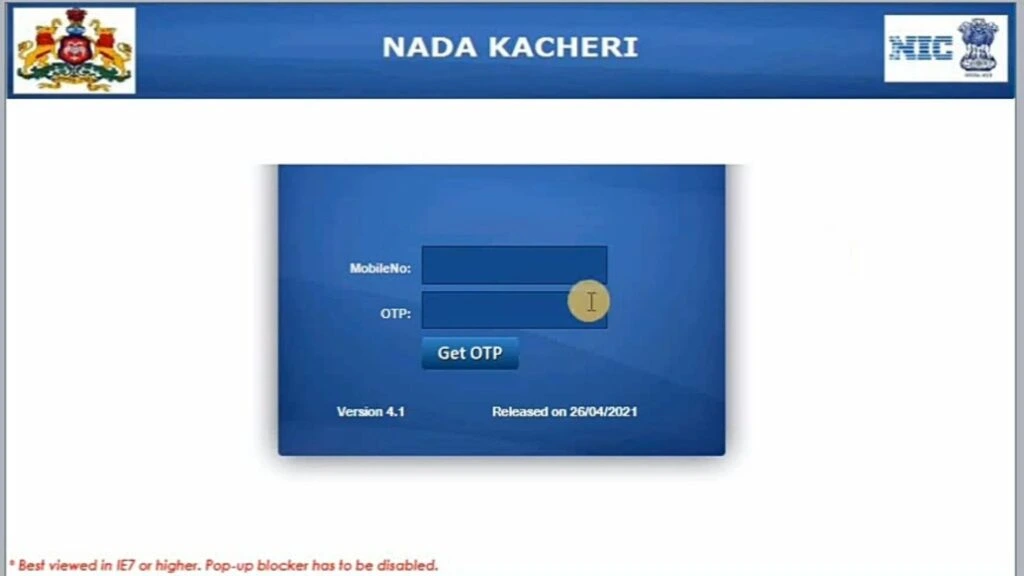
How to Login to Nadakacheri
There are two types of login on Nadakacheri. The public login is for citizens like you. The operator login is only for government staff at Nadakacheri centers. Always use the public login.
- Open the website. Open nadakacheri.karnataka.gov.in on your phone or computer.
- Enter your mobile number. Enter your Aadhaar-linked mobile number.
- Click Get OTP. Click “Get OTP” and wait for the code on your phone.
- Type the OTP. Type the 6-digit code you get on your phone.
- Fill the CAPTCHA. Fill the CAPTCHA if it appears (type the letters or numbers you see).
- You are logged in. You are now logged in and can start a new request.
Problems with Login
OTP not coming
Check your phone signal first. Weak signal is the most common reason the OTP does not reach you. Move to a place with better signal and try again. If still not working, update your mobile number in your Aadhaar at the nearest center.
OTP expired
OTP is valid for only a few minutes. Click “Resend OTP” and type the new code fast.
Login still not working
Open your browser settings and clear history and cache. Or use private mode on your browser (also called secret mode or incognito).
Best time to login
Try between 7 AM and 10 AM or after 8 PM. The website is less busy at these times.
FULL STEPS 2026
How to Apply for a Certificate on Nadakacheri
Applying online takes about 10 to 15 minutes if your documents are ready. Follow these seven steps in order. Do not skip the review step before e-Sign, because you cannot edit your application after that point.
1
Start a New Request
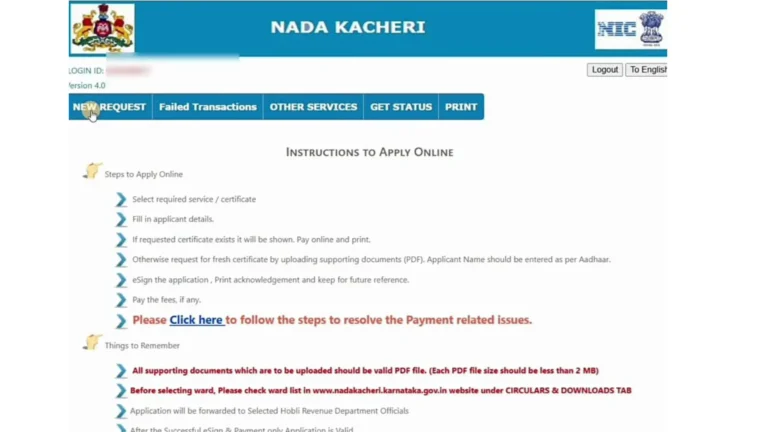
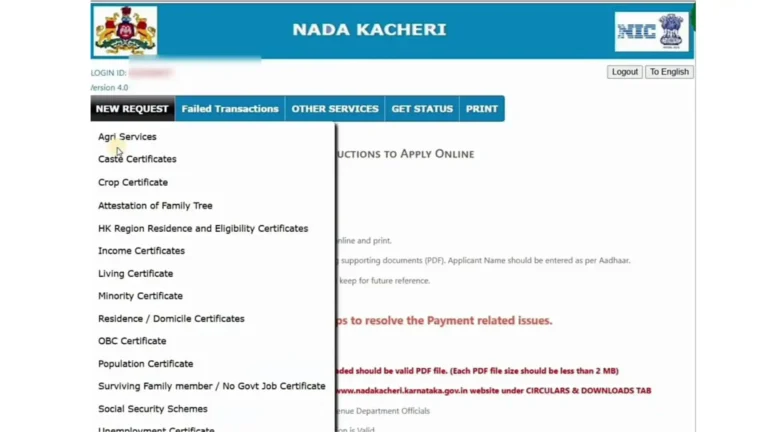
After login, click “New Request” at the top of the page. Choose the certificate you need. Most people pick Caste and Income Certificate together.
2
Enter Your Ration Card Details
The website will ask if you have a Ration Card.
- If yes, type your ration card number. Then choose your name from the family list.
- If no, select “No” and go ahead with your Aadhaar OTP.
3
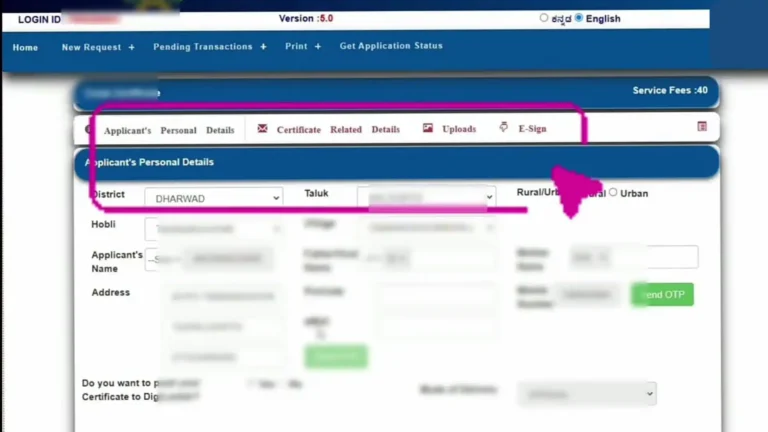
Fill Your Personal Details
Type all your details carefully:
- Full name
- Father’s name or husband’s name
- Full address with pin code
- Email ID and mobile number
After filling, the website will send OTPs to your email and mobile. Enter those codes to confirm your details.
4
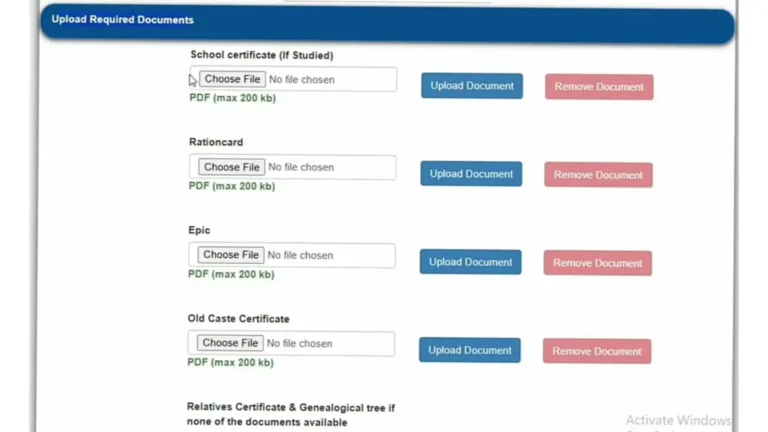
Upload Your Documents
Upload each document as a PDF file. Each file must be smaller than 200 KB. Make sure the scan is clear and easy to read.
For income certificate, you need a self declaration form. This is a simple paper where you write how much money you earn in a year. In most cases, this is enough. You do not need a salary slip. You can get this form from the Nadakacheri website or from your nearest center.
Documents you usually need:
- Aadhaar card (front and back)
- Passport size photo (recent)
- Ration card or any address proof
- Income proof (self declaration form works for most people)
- Old caste certificate or school transfer certificate (for caste applications)
5
Check Everything Before Sending
Read all the details you filled. Check all the files you uploaded. Fix any mistakes now. After this step, you cannot make changes.
6
E-Sign with Aadhaar
Click “Proceed to E-Sign”. Enter your Aadhaar number. You will get an OTP on your phone. Enter it to sign your application online. This is called e-Sign. It works like your signature on paper.
If e-Sign is not working, close the page. Go back to your pending applications. Try e-Sign again. Use a good internet connection. Do not use a VPN during this step.
7
Pay and Submit
Pay the small fee using UPI or QR code. After payment, you will get a receipt with your RD Number, sometimes also called your Acknowledgement Number. Save this number. Take a screenshot. You will need it to check your status and download the certificate.
Your application then goes to the Tahsildar or Deputy Tahsildar at your Taluk office for approval. Nadakacheri comes under Sakala, so if it is delayed beyond the promised time, you can file a Sakala complaint.
TRACK IT
How to Check Your Nadakacheri Application Status and Download Certificate
Once you apply and get your RD Number, you can check the status at any time. You do not need to log in to check status. This works for all types of certificates: income certificate, caste certificate, domicile certificate and others.
How to Do Nadakacheri RD Status Check Online
- Go to ajsk.karnataka.gov.in (the AJSK home page)
- Find the “Application Status” option
- Enter your RD Number exactly as it appears on your receipt
- Click “Check Status”
What Your Status Means
Pending
Your application is waiting. No action needed yet.
Under Process
The officer is checking your documents.
Approved / Ready for Download
Your certificate is ready. Download it now.
Rejected
Something was wrong. Read the reason. Fix it and apply again.
How to Download Your Certificate
When status shows “Approved”, you can download certificate from the same page. Click “Download” or “Print Certificate” and save the PDF. No login needed. Just your RD Number.
The same page works for income certificate status check online and caste certificate status check online. There is no separate page for each type.
CV Nadakacheri Status Check Online: CV means Certificate Verification. If you applied for CV or want to check your CV status, go to ajsk.karnataka.gov.in. Enter your RD Number or CV Number to see the status.
Nadakacheri Certificate Fees
The fees on Nadakacheri are very small. They cover caste, income, OBC, EWS, Non-Creamy Layer and other certificates. Here are the common charges but make sure to check it on the official site:
- Caste Certificate: Rs. 15 to Rs. 25
- Income Certificate: Rs. 15 to Rs. 25
- Caste and Income Certificate (combined): Rs. 25 to Rs. 35
- Domicile Certificate: Rs. 15 to Rs. 25
- Residential Certificate: Rs. 15 to Rs. 25
- OBC Certificate: Rs. 15 to Rs. 25
- Family Tree Certificate: Rs. 25 to Rs. 35
- 371(j) HK Certificate: Rs. 15 to Rs. 25
- Certificate Reprint: Rs. 40
- EWS Certificate: Rs. 15 to Rs. 25
- Non-Creamy Layer Certificate: Rs. 15 to Rs. 25
These fees can change. The exact amount will show on the payment page before you pay. You can pay by UPI and PhonePe. Always pay on the official website only. Never pay cash to anyone outside.
EXPIRY GUIDE
How Long is Each Certificate Valid?
Every certificate has an expiry date. After it expires, you need to renew it. Here is a simple guide:
Caste Certificate (SC/ST)
Valid for life. No expiry. You only need to renew if details change.
Income Certificate
Valid for 1 year. You need to renew it every year.
Caste and Income (combined)
Valid for 1 year because of the income part.
OBC Certificate (State)
Valid for 1 year or for the specific purpose you applied for.
Central OBC (Non-Creamy Layer)
Valid for 1 year. Renew every year for jobs or college.
Domicile Certificate
Valid for life in most cases.
Residential Certificate
Valid for 1 year.
Family Tree Certificate
Valid for the specific use. Apply fresh when needed.
371(j) HK Certificate
Valid for life for Karnataka residents of the region.
The expiry date is printed on your certificate. Check it before submitting anywhere. If you are applying for a scholarship, job or college, check the expiry now and renew it on Nadakacheri first, so your application is not rejected later.
e-Kshana: Get Your Certificate the Same Day
e-Kshana is a special feature in Nadakacheri 5.0. If everything matches, you can get your certificate on the same day you apply.
How It Works
The system checks your details against the government records. If your name, address and other details match perfectly, the certificate is ready the same day.
Who Can Get Same Day Certificate?
- Your Aadhaar mobile number is active and working
- Your village and taluk records are correct
- All documents are clear
Tips to Get Same Day Certificate
- Update your Aadhaar mobile number before applying
- Apply on a normal working day during office hours
- Make sure your name and address are spelled the same everywhere
- Upload clear PDF files smaller than 200 KB
What People Say in 2026
Around 7 to 8 out of 10 eligible people are getting their certificate on the same day, and this rate keeps improving each year. Thousands of people across Karnataka use e-Kshana every month. If you do not get e-Kshana, the normal time is 7 to 15 days.
How to Access Your Nadakacheri Certificate Through DigiLocker
DigiLocker makes it easier to access your Nadakacheri certificate online when it is available on the platform. Before using this service, here are a few important things to know:
How to Find Your Nadakacheri Certificate in DigiLocker
All Services Available on Nadakacheri
Many people think Nadakacheri is only for caste and income certificates. But you can apply for many things here, including the EWS certificate for general category applicants and the Non-Creamy Layer certificate for OBC applicants. Here is the full list:
- Caste Certificate (SC, ST, OBC, Central OBC)
- Income Certificate
- Caste and Income Certificate (both together)
- Domicile Certificate
- Residential Certificate
- Bonafide Certificate
- Family Tree Certificate (Vamshavruksha)
- Legal Heir Certificate
- Agriculture Holdings Certificate (Pahani)
- 371(j) Hyderabad-Karnataka (HK) Certificate
- Old Age Pension (Sandhya Suraksha)
- RTC / Pahani land records (Bhoomi)
- Birth Certificate (at some centers)
- Death Certificate (at some centers)
- EWS Certificate (Economically Weaker Section)
- Non-Creamy Layer Certificate
- Solvency Certificate
- Unemployment Certificate
- Living Certificate (for pensioners)
The list may grow. Always check the website for the latest services.
CV: How to Verify a Nadakacheri Certificate
CV stands for Certificate Verification. This is a separate feature on the AJSK home page. Employers, colleges, banks and government offices uses Nadakacheri CV to check if your certificate is real.
How to Verify
- Go to ajsk.karnataka.gov.in
- Click on “Certificate Verification” or “CV”
- Enter the RD Number from the certificate
- The result will show if the certificate is valid or not
Your CV Number
When your certificate is approved, you get an RD Number and also a CV Number. You can share the CV Number with a college or employer. They can use it to check your certificate online. After approval, check the CV status after 2 to 3 days. If it does not show, call the helpline.
How to Renew an Expired Certificate
Income certificates and caste certificates are valid for a few years. When they expire, you need to renew them. The renewal steps are almost the same as applying for a new certificate.
- Log in to nadakacheri.karnataka.gov.in
- Click “Renewal” from the menu
- Enter your old RD Number
- Check your details and update anything that has changed
- Upload new documents if asked
- Complete e-Sign and pay the fee
Domicile certificate and residential certificate can also be renewed the same way. The time to get the renewed certificate is the same as a new one.
Nadakacheri Helpline and Office Details
Helpline Number
- Number: 080-4455-4455
- Days: Monday to Saturday
- Time: 10:00 AM to 5:30 PM
Office Timings
All Nadakacheri and AJSK centers are open Monday to Saturday from 10:00 AM to 5:30 PM. They are closed on Sundays and Karnataka government holidays. Applying online saves time.
Find an Office Near You
Search “Nadakacheri near me” on Google Maps. Every taluk in Karnataka has at least one AJSK center. Nadakacheri Bangalore has many centers, including Kengeri, Begur, Yelahanka and Jayanagar, and every district headquarters such as Mysuru, Mangaluru, Hubballi, Belagavi and Kalaburagi has its own.
TROUBLESHOOTING
Common Problems and Simple Solutions
❌
Application Rejected
Log in and read the reason. Add the missing documents and apply again. You can apply as many times as you need.
✍️
e-Sign Not Working
Close the page. Go to “Pending Applications” and try e-Sign again. Use a stable internet. Do not use a VPN.
📲
OTP Not Coming
Move to a place with better phone signal. If the problem continues, update your Aadhaar mobile number at the nearest center.
📤
File Upload Not Working
Check that the file is a PDF. Check that it is smaller than 200 KB. Use a free PDF compressor on your phone or computer.
🐌
Website Very Slow
Try early morning or late at night. Fewer people are online at those times.
🔢
RD Number Not Working
Type the RD Number carefully. No extra spaces. Use the number from your latest receipt.
🌳
Family Tree Certificate Rejected
Bring old papers like property documents or old government records. These help prove the family details.
🔍
Caste Not Found in Records
This happens when old records are not saved in the government computer yet. Visit your Taluk office. Bring your old school transfer certificate or any old government document with your caste name.
🆔
GSC Number on Certificate
GSC means Government Service Center. It is the code of the Nadakacheri office that gave you the certificate. You do not need to do anything with it.
Tip: Take a screenshot of every step. Especially save the screen that shows your RD Number.
Documents You Need for Nadakacheri
- Aadhaar card (front and back)
- Recent passport size photo
- Ration card or address proof
- Income proof (self declaration form is enough for most cases)
- Old caste certificate or school transfer certificate (only for caste applications)
Check the website for the exact list for your service. Different certificates may need different documents.
Questions and Answers
Conclusion
Nadakacheri 5.0 (Karnataka AJSK NK5) makes getting government certificates easy and fast. You can log in at nadakacheri.karnataka.gov.in, apply for caste certificate, income certificate, OBC certificate, domicile certificate and many others. Check your status at ajsk.karnataka.gov.in with your RD Number. Verify your certificate using the CV feature.
Keep your documents ready. Update your Aadhaar. Save your RD Number. Whether it is for a scholarship, job or college, applying today means you are not scrambling for it later. Thousands of Karnataka residents get their certificates every month, most in under 10 minutes. Use only the official websites.